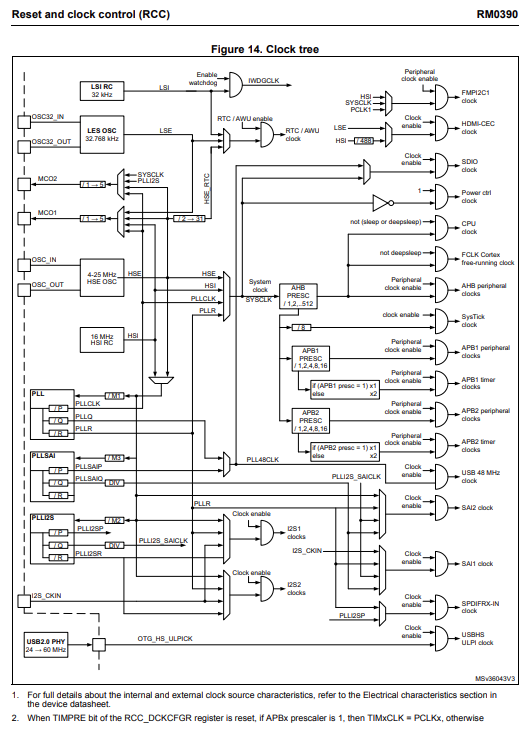
In STM32 ARM Cortex M4 Series has three different clock sources and it is available in the RCC Reset and Clock Control
- HSI Oscillator clock – High Speed Internal
- HSE Oscillator clock – High Speed External
- Two main PLL clocks – Phase Locked Loop
The devices have the two following secondary clock sources
- 32 KHz low-speed internal RC (LSI RC) which used to drives the independent watchdog and optionally the RTC used for Auto-wakeup from the Stop/Standby mode
- 32.768 KHz low-speed external crystal (LSE Crystal) which drives the RTC clock of the MCU
Each clock sources can be switched ON and OFF independently when it is not used to optimize power consumption
Important Points to be Remembered
- When MCU Starts then controller will start with HSI clock then later based on the configuration it will continue whether to choose to continue with HSI or Selecting HSE or PLL
- We have AHB and APB buses, before using any peripheral we have to configure the required clock sources to run the peripheral
- some peripheral required more clock in that case we have to use PLL and multiply
- By Default, peripheral clocks of all most of all peripherals will be disabled to save power
- A peripheral won’t take or respond the configuration values until enabled its peripheral clock – Parent bus must be enabled before init peripheral
- In STM32, peripheral clocks are managed with RCC Registers
Verifying the Configured Clock
In STM32 Controller having a specific feature where we can see the configured clock. For the two signal features available that is MCO2 and MCO1. Thes are called as Signals
Where here, enable this feature by selecting the MCO2 and MCO1. Actually MCO1 and MCO2 are not GPIO, it is a alternate functionality and it can be configured to the GPIO of the MCU by configuring the GPIO mode
With that we can measure the configured clock
- MCO1: SYSCLK, PLLI2SCLK, HSE, PLLCLK
- MCO2: LSE, HSE, HSI, PLLCLK
Default this feature is disabled we have to enable in RCC Registers by selecting Master Clock Output 1 and 2
Reference